Hello Assume I've the following nested routines
string sExtern = "Extern";

void someRoutine() {
    string sInternSomeRoutine = "Something";
 void someInnerRoutine() {
  print "sExtern:" sExtern "\n";
  // print "sInternSomeRoutine:" sInternSomeRoutine "\n";
 }
 print "sInternSomeRoutine:" sInternSomeRoutine "\n";
 someInnerRoutine();
}
someRoutine();
In this exaple wie have the outer routine someRoutine and the inner routine someInnerRoutine. And as you can see, it is no problem to get access to the global outer variables as to the lokal variable of each routine itself. But in C or Pascal it is also possible to get access to the variables of someRoutine from iside of someInnerRoutine. But in Dxl, that seems impossible, is that correct? Best regards Wolfgang Uhr Wolfgang Uhr - Tue Jun 24 03:19:59 EDT 2014 |
Re: Problem with variables in nested routines You are correct, unlike C you cannot access local variables declared within the outer function. I have never used nested functions in DXL as I have never found the need.
Tony |
Re: Problem with variables in nested routines Tony_Goodman - Tue Jun 24 03:56:35 EDT 2014 You are correct, unlike C you cannot access local variables declared within the outer function. I have never used nested functions in DXL as I have never found the need.
Tony Thanks Tony I have never found the need. Each callback for a button for example requires that need.
void closeDialog_(DBE someControl) {
    if (someControl == btnHugo) {
 }
 if (someControl == btnEgon) {
 }
}
Best regards Wolfgang
|
Re: Problem with variables in nested routines This is why you get "non-global variable access" interpret errors if you put a normal include file inside a function; such as the native ExportWord include file. I've got a small handful of nested routines, mostly trivial callbacks inside library functions. Not really a "need" more a "lazy". I can indeed see a "need" though, to hide some dangerous function inside a routine that does a bunch of suitablility checks first. -Louie |
Re: Problem with variables in nested routines Wolfgang Uhr - Tue Jun 24 04:23:08 EDT 2014 Thanks Tony I have never found the need. Each callback for a button for example requires that need.
void closeDialog_(DBE someControl) {
    if (someControl == btnHugo) {
 }
 if (someControl == btnEgon) {
 }
}
Best regards Wolfgang
Nested functions are only really useful for not cluttering the global namespace inside libraries, as far as I could determine. The observation with the variables is correct, however there is some important thing to notice: This restriction does not apply to functions! Therfore the following code is perfectly valid:
void a () {
    void func() { ack "Hallo"; }

    void b () {
       void c() { func(); }
    }
}
I also had cases, where I wanted to pass information about the DBE to a nested callback, but usually I do something like this in that case:
void popupMyDialog () {
   DB x = centered "Popup"

   void cb_func (string s) { ack "Hello " s "!" }
   void cb_hugo (DBE) { cb_func "Hugo" };
   void cb_egon (DBE) { cb_func "Egon" };

   DBE btHugo = button (x, "Hugo", cb_hugo);
   DBE btEgon = button (x, "Egon", cb_egon);
   block x;
   destroy x;
}

popupMyDialog ()
The good thing is, that this approach will also work for more complex parameters. And now I will wait to see if you are right and the post will really appear correctly after some time ... I used to drop the code plugin again in firefox, because it messed up all my code and started to format manually :-) Regards, Mathias |
Re: Problem with variables in nested routines Mathias Mamsch - Tue Jun 24 15:27:50 EDT 2014 Nested functions are only really useful for not cluttering the global namespace inside libraries, as far as I could determine. The observation with the variables is correct, however there is some important thing to notice: This restriction does not apply to functions! Therfore the following code is perfectly valid:
void a () {
    void func() { ack "Hallo"; }

    void b () {
       void c() { func(); }
    }
}
I also had cases, where I wanted to pass information about the DBE to a nested callback, but usually I do something like this in that case:
void popupMyDialog () {
   DB x = centered "Popup"

   void cb_func (string s) { ack "Hello " s "!" }
   void cb_hugo (DBE) { cb_func "Hugo" };
   void cb_egon (DBE) { cb_func "Egon" };

   DBE btHugo = button (x, "Hugo", cb_hugo);
   DBE btEgon = button (x, "Egon", cb_egon);
   block x;
   destroy x;
}

popupMyDialog ()
The good thing is, that this approach will also work for more complex parameters. And now I will wait to see if you are right and the post will really appear correctly after some time ... I used to drop the code plugin again in firefox, because it messed up all my code and started to format manually :-) Regards, Mathias Hello Mathias It is someting more
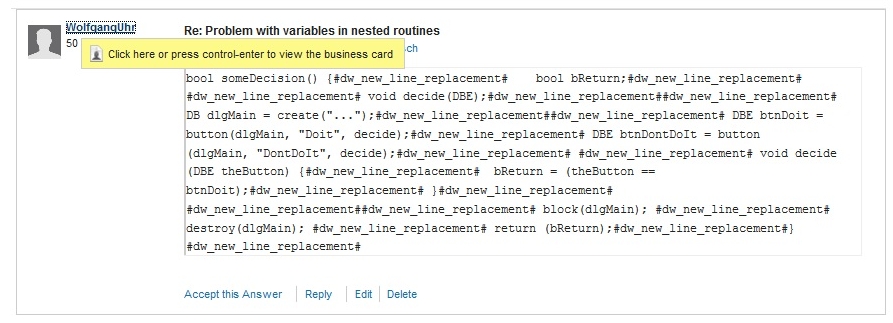
bool someDecision() {
    bool bReturn;

 void decide(DBE);

 DB dlgMain = create("...");

 DBE btnDoit = button(dlgMain, "Doit", decide);
 DBE btnDontDoIt = button(dlgMain, "DontDoIt", decide);

 void decide(DBE theButton) {
  bReturn = (theButton == btnDoit);
 }


 block(dlgMain);
 destroy(dlgMain);
 return (bReturn);
}
This routine has a complete Dialog box inside. There is no global paramter nor a global callback or something. The only real problem ist: There is no access on bReturn (btnDoIt is not so important, therefore I could take two callbacks). Wolfgang |
Re: Problem with variables in nested routines Mathias Mamsch - Tue Jun 24 15:27:50 EDT 2014 Nested functions are only really useful for not cluttering the global namespace inside libraries, as far as I could determine. The observation with the variables is correct, however there is some important thing to notice: This restriction does not apply to functions! Therfore the following code is perfectly valid:
void a () {
    void func() { ack "Hallo"; }

    void b () {
       void c() { func(); }
    }
}
I also had cases, where I wanted to pass information about the DBE to a nested callback, but usually I do something like this in that case:
void popupMyDialog () {
   DB x = centered "Popup"

   void cb_func (string s) { ack "Hello " s "!" }
   void cb_hugo (DBE) { cb_func "Hugo" };
   void cb_egon (DBE) { cb_func "Egon" };

   DBE btHugo = button (x, "Hugo", cb_hugo);
   DBE btEgon = button (x, "Egon", cb_egon);
   block x;
   destroy x;
}

popupMyDialog ()
The good thing is, that this approach will also work for more complex parameters. And now I will wait to see if you are right and the post will really appear correctly after some time ... I used to drop the code plugin again in firefox, because it messed up all my code and started to format manually :-) Regards, Mathias > And now I will wait to see if you are right and the post will really appear correctly after some time ... I used to drop the code plugin again in firefox, because it messed up all my code and started to format manually :-) If've made a screenshoot to demonstrate my first view of a posting Attachments BadResult.jpg |